
MC Modpacks Manager for Blueprint
Information
Before installing MC Modpacks Manager, make sure that you have Blueprint installed. Blueprint allows extensions like MC Modpacks Manager to have great compatibility with other modifications made by themes & extensions. You can find more information, download links and documentation at https://blueprint.zip.
Installation
Using an SFTP client of your choice, upload the mcmodpacks.blueprint file
into your Pterodactyl directory (usually located at /var/www/pterodactyl).
Now, Install the extension by running the following command: bash blueprint -install mcmodpacks.blueprint
Upload Egg
This egg is automatically managed by the extension and you should not create any servers with it. For creating servers you should use Minecraft Java Egg by MC Jars.
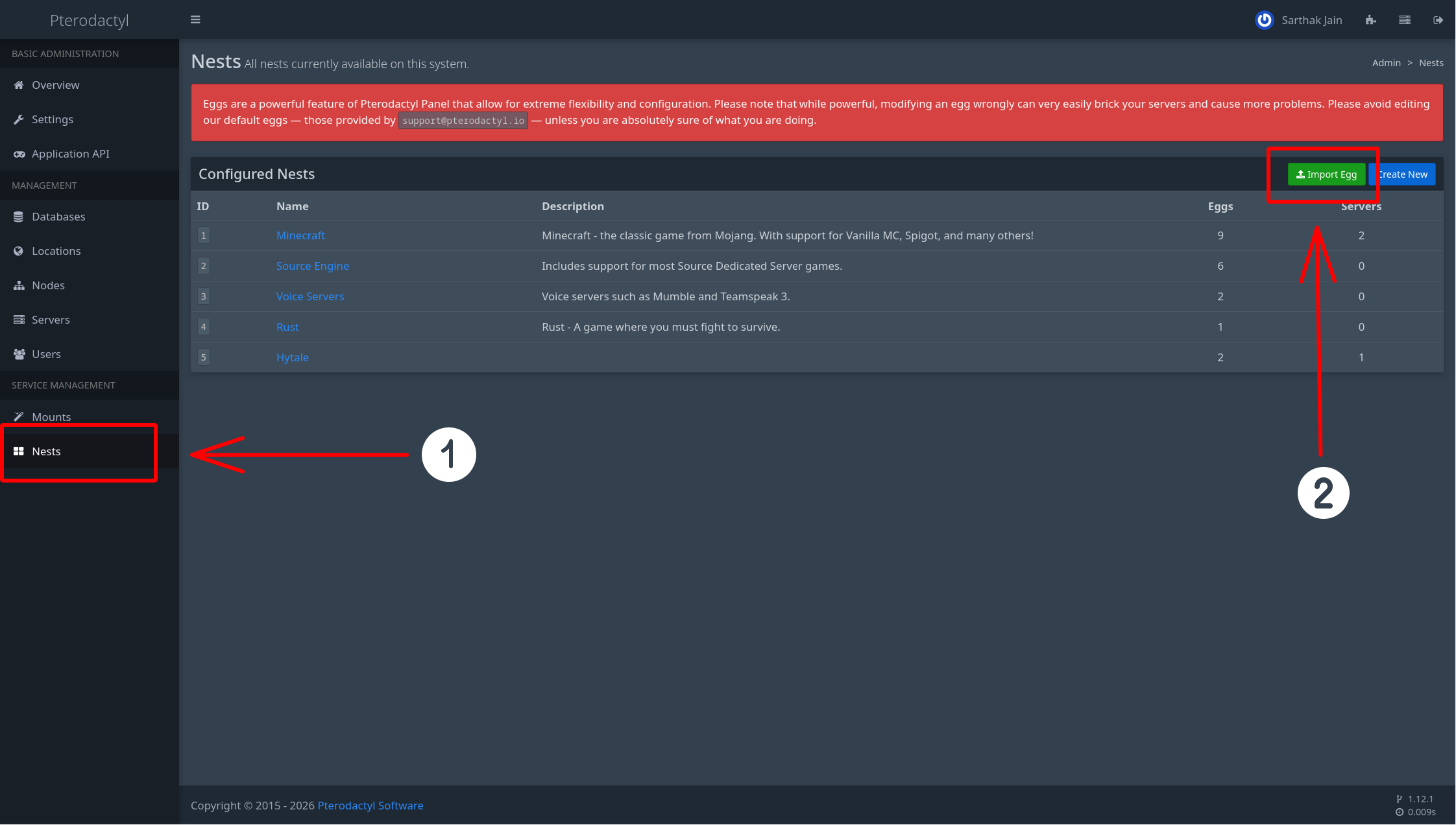
Go to Nests tab in Admin Settings and Click on Import Egg button.
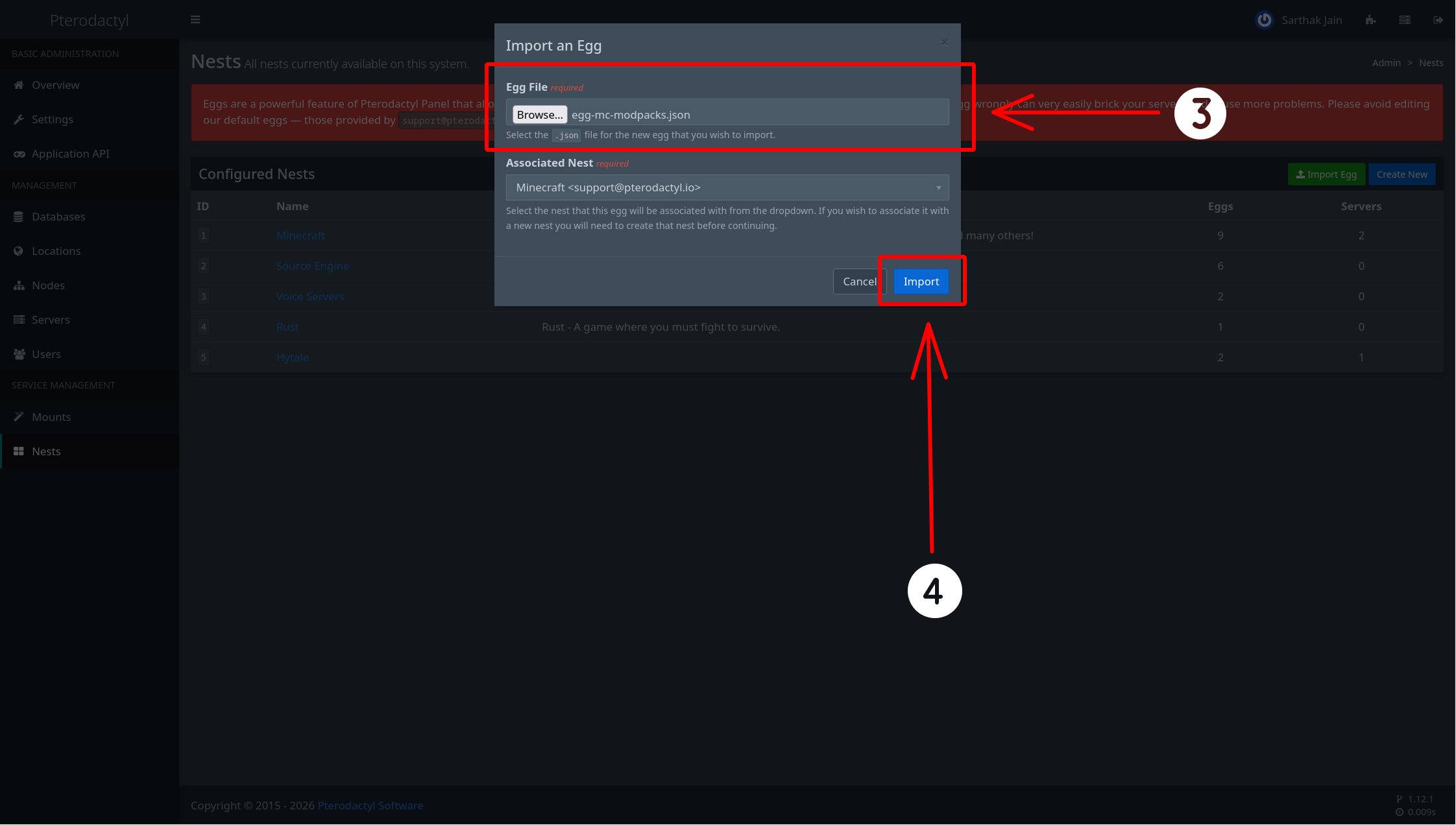
Upload egg-mc-modpacks-installer.json and click on Import button.
Configure CurseForge
MC Modpacks Manager uses CurseForge API to provide access to a large library of Minecraft modpackls. To obtain your key follow the steps below:
Create a account at CurseForge Console
Generate an API key and paste it in the extension's settings.
Wings Modification
If you have already completed this step for any of the following extensions — MC Plugins Manager, MC Mods Manager, or Hytale Mod Manager — you do not need to do it again. They all use the same Wings modification.
These steps apply only to nodes running Pterodactyl Wings and must be completed on each node. If you are using Calagopus Wings, you can skip this section entirely — everything will work without any additional modifications.
Make sure you don't run the commands below inside your Pterodactyl directory (usually located at /var/www/pterodactyl)
Install GoLang
Pterodactyl Wings is written in Go, and Go is required in order to build a Wings binary. If you are using a Debian-based or Ubuntu-based distribution, install Go by running:
apt-get install -y golangOn other distributions, install Go using the distribution's package manager.
Apply patch
Start by cloning the Pterodactyl Wings repository:
git clone https://github.com/pterodactyl/wings.git pterodactyl-wings
cd pterodactyl-wings
Next, using an SFTP client of your choice, upload the WingsModification.patch file into the cloned pterodactyl-wings directory.
Once uploaded, apply the patch by running:
patch -Np1 -i WingsModification.patchReplace Wings Binary
Once the build is complete, stop the currently running Wings service, replace the binary with the newly built one, and start Wings again:
systemctl stop wings
cp "build/wings_linux_$(uname -m | sed -e 's/x86_64/amd64/' -e 's/aarch64/arm64/')" /usr/local/bin/wings
systemctl start wings
Need help?
If you have any questions or need assistance with the installation, feel free to contact us through:
- Support Server: https://discord.gg/sQjuWcDxBY
- Email: sarthak@stellarstudios.xyz